| 일 | 월 | 화 | 수 | 목 | 금 | 토 |
|---|---|---|---|---|---|---|
| 1 | 2 | 3 | 4 | 5 | 6 | |
| 7 | 8 | 9 | 10 | 11 | 12 | 13 |
| 14 | 15 | 16 | 17 | 18 | 19 | 20 |
| 21 | 22 | 23 | 24 | 25 | 26 | 27 |
| 28 | 29 | 30 |
- 나노바나나2
- 나노바나나 프로
- 스마트스토어 이미지
- 프롬프트
- 제미나이
- 구글이미지생성
- 나노바나나
- 룩북만들기
- 상세페이지 이미지 생성
- 이미지 생성 자동화
- NanoBananaPro
- 핀터감성
- NANOBANANA PRO
- 나노바나나pro
- AI이미지생성
- 나노바나나 프롬프트
- 제미나이 왕홍
- 왕홍필터
- AI이미지 생성
- 나노바나나프로
- 왕홍체험 프롬프트
- 카페포스터 만들기
- 쇼핑몰AI활용
- ai 프롬프트
- 나노바나나2 프롬프트
- ai마케팅
- ai프롬프트
- 이미지생성
- AI모델착용샷
- 제미나이 프롬프트
- Today
- Total
리아의 AI 연구소
영화관 웨딩스냅 AI로 10초만에 만드는 법 본문


요즘 영화관 웨딩스냅이 제 알고리즘을 점령했어요. 한번 찍어보고 싶어서 찾아봤더니 스튜디오에서 찍으면 몇십만 원은 기본... 이걸 커플 사진 딱 한 장으로 만들 수 있다면요?
나노바나나 프로한테 시켜봤더니 진짜 찐 웨딩스냅급으로 나와서 깜짝 놀랐어요. 그래서 바로 프롬프트 정리해서 가져왔습니다.
프롬프트 전문
아래 프롬프트를 복사해서 나노바나나 프로(Nano Banana Pro)에 커플 사진과 함께 붙여넣기 하시면 됩니다.
Use the uploaded COUPLE PHOTO as the identity reference and keep both people recognizable and consistent:
- Preserve EXACT face structure/proportions, eyes/nose/mouth shape, skin tone, hairline, hairstyle, body type, and the RELATIVE height difference between them.
- Keep a natural, candid couple vibe (no stiff posing), but DO NOT change who they are. No "AI face", no beautify/retouch, no age change.

SCENE / BACKGROUND (fixed, MUST FOLLOW):
Photorealistic classic cinema with bright RED fabric seats and small yellow seat numbers.

ABSOLUTE ROW RULE (MOST IMPORTANT):
- The couple MUST be seated in the VERY FRONT ROW (Row 1), the closest row to the camera.
- Their bodies must be directly against the front-row seat backs (they are sitting on the front-row seats).
- There must be NO red seat backs in front of them (no foreground seats blocking the bottom of frame).
- The camera is positioned in the aisle directly in front of Row 1, at seated eye level, perfectly straight-on.

BACKGROUND DEPTH CONTROL:
- Show ONLY 2–3 rows BEHIND the couple, fading into darkness.
- Those back rows must be smaller/softer due to depth, but clearly BEHIND them.
- Do NOT show 5+ layers of rows; do NOT place the couple in the middle rows.

LIGHTING / CAMERA LOOK:
Direct on-camera FLASH snapshot (hard frontal flash, quick falloff), slightly overexposed highlights on skin and fabric, deep shadows behind, subtle vignette, mild film grain, 35mm point-and-shoot aesthetic, crisp focus, natural color with tiny warm cast.

COMPOSITION:
1:1 square crop. Medium-to-full shot (waist-up to mid-thigh).
Centered couple, perfectly frontal and symmetrical, realistic perspective, no distortion of faces.

EDITABLE OUTFITS (replace bracket values):
- Woman outfit: [WOMAN_DRESS_COLOR = WHITE or BLACK] elegant dress (clean silhouette, satin/soft chiffon feel), optional veil: [VEIL = ON or OFF]
- Man outfit: [MAN_OUTFIT = black suit + white shirt + tie] (or "casual white shirt + black pants")

EDITABLE PROP (choose ONE):
[PROP = bouquet of flowers OR film clapperboard/slate OR popcorn + drink OR none]
If PROP is used, it must be realistically held and correctly sized, with natural hand contact.

POSE (natural + candid):
[POSE_STYLE = playful candid / romantic close / cheeky goofy]
Seated close together, slight lean/interaction, genuine smiles/laughter. Hands and fingers anatomically correct.

STRICT NEGATIVES:
No extra people. No text overlays, logos, watermarks, captions, UI elements.
No extra objects beyond the chosen PROP.
No warped faces, no duplicate limbs, no plastic skin, no heavy makeup change, no outfit glitches.
No background substitutions.
No foreground seats in front of the couple.
Do NOT place the couple in the middle row.
옵션 바꾸는 법
이 프롬프트의 핵심은 대괄호 [ ] 안의 값만 바꾸면 다양한 버전을 만들 수 있다는 거예요. 처음 보시면 영어라 어려워 보일 수 있는데, 바꿔야 할 부분은 딱 4가지뿐이에요.

1. 드레스 색상
[WOMAN_DRESS_COLOR = WHITE or BLACK]
WHITE로 하면 웨딩드레스 느낌, BLACK으로 하면 시크한 이브닝 드레스 느낌이에요. 개인적으로 WHITE는 클래식 웨딩 감성, BLACK은 영화 시사회 무드가 나서 둘 다 추천합니다.
2. 베일 착용 여부
[VEIL = ON or OFF]
ON으로 하면 얇은 베일이 추가돼서 웨딩 느낌이 확 살아요. OFF로 하면 좀 더 캐주얼한 커플 화보 느낌이 납니다.
3. 소품 선택
[PROP = bouquet of flowers OR film clapperboard/slate OR popcorn + drink OR none]
이 부분이 제일 재밌어요! 원하는 소품 하나만 골라서 적으면 됩니다.
- bouquet of flowers → 꽃다발 (웨딩 감성 극대화)
- film clapperboard/slate → 영화 슬레이트 (영화관 컨셉에 찰떡)
- popcorn + drink → 팝콘과 음료 (데이트 무드)
- none → 소품 없이 깔끔하게
4. 포즈 스타일
[POSE_STYLE = playful candid / romantic close / cheeky goofy]
- playful candid → 자연스럽게 장난치는 느낌
- romantic close → 다정하게 붙어 있는 로맨틱 무드
- cheeky goofy → 웃기고 귀여운 느낌
원하는 분위기에 맞게 하나만 골라 적으면 돼요!
사용 방법
1단계: 커플 사진을 준비해주세요. 두 사람 얼굴이 잘 보이는 정면 사진이 제일 좋아요. 셀카보다는 다른 사람이 찍어준 사진이 결과가 훨씬 잘 나옵니다.
2단계: 나노바나나 프로(Nano Banana Pro)에 접속해서 사진을 업로드하고, 위 프롬프트를 붙여넣기 하세요. 이때 [ ] 안의 옵션은 원하는 대로 바꿔주시면 됩니다. (옵션에 없더라고 원하시는 착장이나 소품을 기재하시면 그거대로 나옵니다!)
3단계: 생성 버튼 누르고 기다리면 끝!


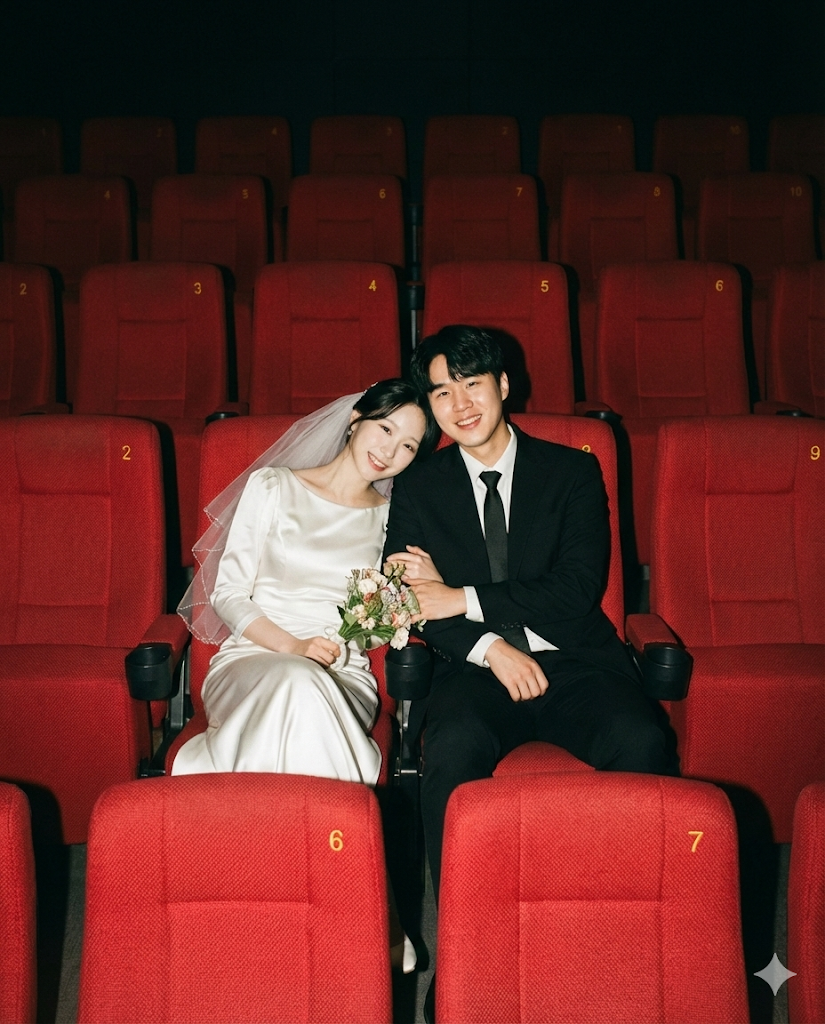
실제 결과물 모음
같은 프롬프트인데 옵션만 바꿨을 때 어떻게 달라지는지 보여드릴게요.


잘 나오게 하는 팁
제가 이 프롬프트로 여러 번 돌려보면서 느낀 점 몇 가지 공유해드릴게요.
원본 사진이 중요해요. 두 사람의 얼굴이 선명하게 나온 사진일수록 결과물이 좋아요. 너무 멀리서 찍은 사진이나 한쪽이 가려진 사진은 피해주세요. (여자분들은... 메이크업 한 사진으로 하시는 것을 추천드립니다.)
옵션 조합을 다양하게 해보세요. 같은 사진이어도 드레스 색상이랑 소품만 바꾸면 완전 다른 분위기가 나와요. 저는 보통 한 사진당 2~3가지 조합으로 뽑아봅니다.
가끔 좌석 배치가 이상하게 나올 수 있어요. 커플이 앞줄이 아니라 중간줄에 앉아 있거나, 좌석이 어색하게 겹치는 경우가 있는데 그때는 그냥 다시 생성하면 됩니다. 프롬프트에 좌석 관련 지시를 꽤 디테일하게 넣어둬서 대부분은 잘 나오는 편이에요.
마무리
웨딩스냅은 아니더라도 커플 기념일 사진이나 프로필 사진 만들 때 써보면 진짜 반응 좋아요. (돈 굳었다! 그 돈으로 맛있는거 한번 더 드세요!) 예신 예랑 분들도 한번 해보시고 커플끼리도 해보면 너무 좋은 추억이 될 것 같아요!
궁금한 점 있으시면 댓글로 편하게 물어봐주세요!
'맛도리 프롬프트 저장소' 카테고리의 다른 글
| AI로 만드는 미감 좋은 브랜드 포스터, 나노 바나나 2 프롬프트 (0) | 2026.03.03 |
|---|---|
| 블로거들 주목! 유료 어플 필요 없는 몽글몽글 버터 필터 프롬프트 공유 (0) | 2026.03.02 |
| 사장님들 주목! 막 찍은 제품 사진 1장으로 광고컷 만드는 AI 프롬프트 3종 (0) | 2026.02.27 |
| 스노우 블루라이트 필터 AI 프롬프트 낋여왔어요! (0) | 2026.02.27 |
| 셀카 한 장이면 나도 갸루? AI로 요즘 핫한 갸루샷 만드는 법 (0) | 2026.02.27 |


